Skip to content

For the love of god can we REMOVE THE AMBIENT NOISE FROM LOBBY?

Theorchero··135 votes·9,487 views

I like having my lobby up so whenever I want to play next (after my break) I can shortly hit "find game" and I'm good to go.

But it's annoying as fuck to have this "swhiiiissshh swiiiishh" constant background noise that's completely unnecessary.

At least give us the option to remove it without having to completely turn off the client's sound or switch to Profile.

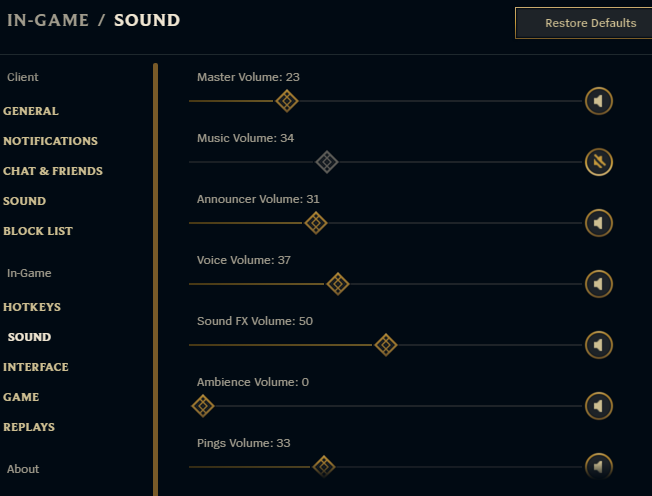
Edit for all the IDIOTS who think that you can just "turn off ambience":

https://i.gyazo.com/a16d58455901b6ef12d3ffff200c43cc.png

STILL HEAR IT.

https://i.gyazo.com/aa303736872f7399190a13e4d195d245.png

Oh look, STILL HEAR IT.

77 Comments

LumberjackingOff9 votes

use your volume mixer to turn down the sound from the league client

Marshbouy31 votes

But then you can't hear the sound when the queue pops. EDIT: actually in the sound mixer it is two different things, so sorry Gath, you are right.

General Esdeath 4 votes

But OP said he wasn't in queue, he's sitting there waiting to hit "find game"

Marshbouy4 votes

So you have to manually go into the interface and turn on/off sounds every time you want to get in a queue? Sounds like a huge waste of time on something that should be a simple feature.

General Esdeath 3 votes

It's not interface, Gath said to turn off the sound from volume mixer.

Enloct2 votes

It isn't the same option in the sound mixer. You can leave one loud and the other quiet - I used to do this.

Marshbouy1 votes

fixed.

SweedishGunner9 votes

Agreed. It's really annoying, I want to hear the client sounds like queue popping but the ambient wind sound does nothing.

Melodox7 votes

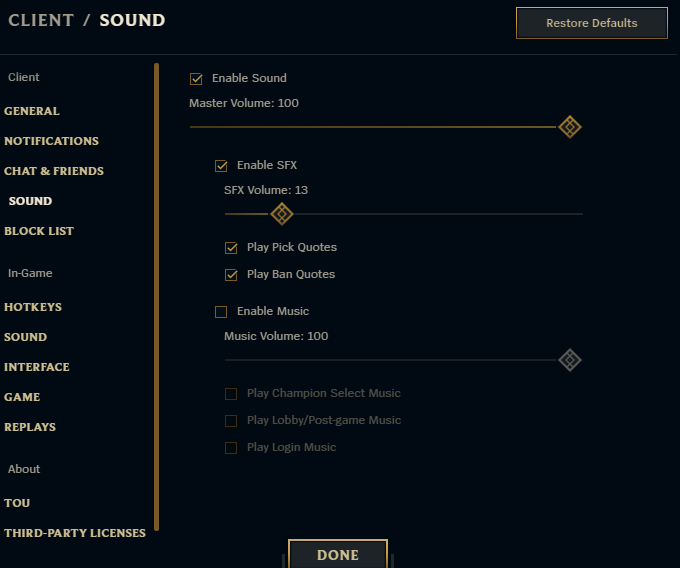
actually there is a way to turn it off. hit the gear above your name and go through the settings look for sound and it should be there

50000000000000003 votes

Yeah, I only have sound effects on and music turned off. In game settings are separate so you can still listen to in game music, iirc.

kargish4 votes

You can turn it off in the options menu

Praetor Notorias3 votes

That turns off all the sounds. You can't mute just the ambient noises, which I agree are annoying.

If the ambient noises were tied into the "music" section you could mute that. That would make entirely too much sense though for Riot.

kargish4 votes
Praetor Notorias3 votes

That's exactly how mine looks, sounds still play. Sorry.

Dr Poro1 votes

This ambient sound isn't music. It still plays when you have music disabled but SFX enabled.

Shadòw4 votes

there is an option for it in the settings.

jesus is this kind of shitpost really getting upvoted?

Theorchero5 votes

{quoted}

there is an option for it in the settings.

jesus is this kind of shitpost really getting upvoted?

No, there isn't.

Dr Poro4 votes

The ambient sound isn't music. I have this toggled off and it still plays.

Shadòw1 votes

well it is off for me at least

Dr Poro2 votes

Click on play, choose a game type and sit in the "lobby". It's the place where you can invite friends and see who's in your party. The ambient sound only plays there. If you go back to "home" there's no ambient sound.

Shadòw1 votes

ye i know.

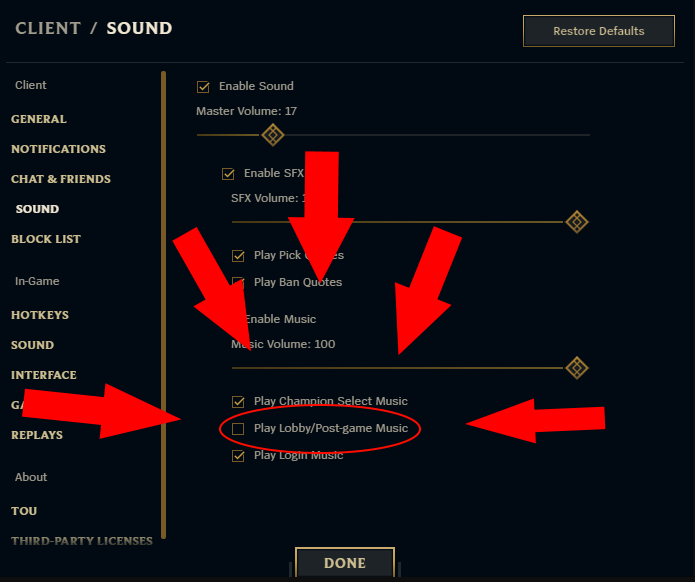
no sound for me there, i turned it off because i thought it was annoying and it worked for me. prob just a client bug for some people, as the option should turn lobby music off if disabled.

dunno if it has something to do with it, but i also have champion select music disabled. (the picture up there wasn't mine, i just added the arrows)

so i only have Login Music checked.

it works as intended for me, i have no ambient sounds/music in the Lobby or Champ Select, only the SFX.

Dr Poro1 votes

Perhaps your audio is too silent for you to notice. Try putting it on 100%. If it is a bug, then they should DEFINITELY fix it.

Shadòw1 votes

like i said, i heard it and had it, and turned it off.

i have no sound in Lobby apart from SFX, even on 100

Dr Poro1 votes

Just so we're talking about the same thing, you mean this lobby right? https://i.ytimg.com/vi/nVQo26O81bg/maxresdefault.jpg (picture is from google images, I don't know this guy)

SaltyMurloc1 votes
ˉˉˉˉˉˉ3 votes

It is in Settings, in Sound, at the bottom.

Bjørnetjenesten3 votes

{quoted}

It is in Settings, in Sound, at the bottom.

No its not, you can only disable music, which doesn't change the background wind-effect in the lobby. Only way to disable it, is by unchecking sfx in sound. But this also disables all the useful sounds like queue popping etc.

Theorchero1 votes
Yammia3 votes

sounds like first world problems to me [slayer-pantheon-thumbs]

Dr Poro6 votes

Yeah, well we live in the first world so it are relevant problems.

Pandemic Punch3 votes

You can mute the client on Windows' volume mixer.

Dr Poro1 votes

Yes, but it will also mute useful noises like friend messages or match found. Same thing if you mute SFX.

AmazoX3 votes

48 up votes, Do these people even check?!

https://i.gyazo.com/b0082f45279d6ef1d5dcacb440ceef80.png

Dr Poro2 votes

He's not talking about music but ambient sound (those birds whistling when you're sitting in a lobby). It's tied to SFX just like the sounds of match found or friend chat messages.

AmazoX2 votes

[{quoted}](name=Dr Poro,realm=EUW,application-id=3ErqAdtq,discussion-id=04aEXeGk,comment-id=00150000,timestamp=2017-08-19T23:39:50.573+0000)

He's not talking about music but ambient sound (those birds whistling when you're sitting in a lobby). It's tied to SFX just like the sounds of match found or friend chat messages.

Never heard em.

Theorchero1 votes

{quoted}

Never heard em.

Then your setup is weird. I've even turned off ALL sound in my client completely and it only stopped then. Disabling everything SFX related is the only way to stop it but it prevents sounds that alert me to champion select status.

Rhaegar11 votes

Then his settings are correct. I also never hear those sounds after I turned lobby music off

Theorchero2 votes

{quoted}

Then his settings are correct. I also never hear those sounds after I turned lobby music off

It's more likely he has his client volume too low to be able to actually hear it. I've disabled ALL non sfx sounds to no affect, it's legit impossible to turn off that noise with affecting EVERY other client SFX noises that are important.

SuperCosmicHobo2 votes

Lol ya

Jeddite2 votes

The Microsoft Model™ -- when fruit-developers decide new "features" are needed (or existing features removed) -- when literally nobody was asking for it -- and no option to toggle.

Tormentula2 votes

I wouldn't want it removed

I just would've liked a disable feature, kinda like loading screen music can be muted. Its a nice touch just it doesn't suit everybody in every situation. You can mute loading screen and still hear the login notification so idk why they can't let us have a mute ambient noise in the lobby.

Depraving2 votes

the ambient sound is really annoying. I want to keep my sfx sound on for when people message me and junk but I dont think it's worth it. I dont understand why there is ambient crap on a client. I don't understand why you wouldn't leave a separate option for only it to turn it off.

Graveo1 votes

This irritates me to no end. I'm trying to set up my runes and listening to a video with tips about it and can't hear over the wind and other noises. I have to disable all sound while trying to think with the over bearing noise.

This problem has been around for awhile now from what I've found searching for a fix for this in google.

Depraving1 votes

{quoted}

This irritates me to no end. I'm trying to set up my runes and listening to a video with tips about it and can't hear over the wind and other noises. I have to disable all sound while trying to think with the over bearing noise.

This problem has been around for awhile now from what I've found searching for a fix for this in google.

lollll that's great because I was the same way. I was trying to do the same and understand the new rune pages and was just like why is this quiet but just loud enough to hear music playing. I guess previous to the patch I must've kept my sound quieter because I don't recall hearing it prior to it, but like you I was watching videos so my sound was louder and it wouldn't stop. Went crazy trying to figure out how to stop it, couldn't figure out a way except muting all sound effects, got annoyed, and turned off league without finishing my pages. What's funny is when I first log on I dont hear it, it's when I start clicking around on crap like the rune pages at some point I'll just hear it start playing. I don't know. either way, needs to have a toggle or just go away.

OhuSHi EyZ1 votes

seriously i turn off ambient volume yet i get ambient noise... wtf

Leonism1 votes

I love it when every one just says mute it... it doesnt work if the SFX sound is on. Seriously this sound is so annoying and it doesnt stop when the queue pops or the game starts...

AdeBug1 votes

I noticed it last night too and just exited the dam Q cus I was tryin to hear smth I don't think this was in the previous client. used to be dead silent, just like i like it.

More from Gameplay

More by Theorchero