[June 8, 2016] Comcast Provider Connection Issues

ModWuks·6/9/2016, 5:56:27 AM·12 votes·7,810 views

https://i.gyazo.com/a37cbcfda62d426ec444701f4de6b605.png

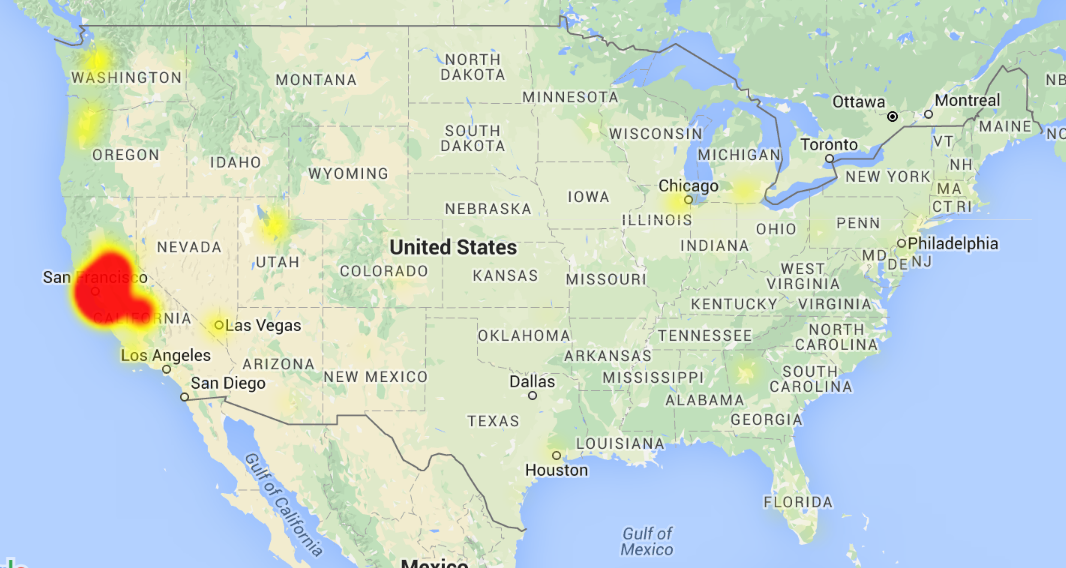
Image taken as of 6/8/2016 - 11:34PM from http://downdetector.com/status/comcast-xfinity/map/

6/10/2016 - 6:16AM PST: I'm heading out of the country soon, so this is my last update. Deep Terror Nami will be managing the thread from here, and any questions can be directed towards him. GL! 6/10/2016 - 12:51AM PST: We're getting reports that the packet loss is occurring again for several Bay Area customers. Issue appears ongoing and intermittent.


6/9/2016 - 12:21PM PST: We're getting reports that there are packet loss and login issues for Comcast customers. If you can, please provide the info requested below! The issue's being escalated with Comcast, and info will be posted here as it comes in. 6/8/2016 - 11:50PM PST: It's reported that the issue might be resolved. If you're still encountering issues, please post below!

Greetings!

There have been reports that Comcast customers are having general connectivity issues with Riot and other services. At this time, there isn't too much information available; however, should there be any updates, I'll do my best to provide them here. If you or someone you know is having connectivity issues, please respond with the following information:

  1. ISP (Internet Service Provider), ie. Verizon, etc.
  2. Region and/or State (Southwest/Arizona, Northeast/Washington, etc.)
  3. Have you checked out the Troubleshooting Connection Issues article and tried the solutions posted there?
  4. When did this issue start occurring? - [Date & Estimate of time]
  5. How often does this issue occur? - Every game? Occasionally, about every 3 games? Etc.
  6. Please post your results from the Connection Test: Log Reader
  7. Please, please, PLEASE include a tracert to the League of Legends servers. [GUIDE]
  8. Additional information that you'd like to provide?

I'll be reaching out to NOC to ensure that they're aware of the situation.

Thanks all!

107 Comments

Cyberlady6/9/2016, 6:30:53 AM2 votes

Northern California, Comcast Cable. Started today, 2 or 3 hours ago, happens everygame and with the chat too, I can't even stay connected in the game chat.

1 <1 ms <1 ms <1 ms 192.168.0.1 2 8 ms 8 ms 9 ms 96.120.88.93 3 9 ms 8 ms 9 ms te-0-2-0-7-sur04.sanjose.ca.sfba.comcast.net [162.151.30.29] 4 10 ms 21 ms 10 ms hu-0-3-0-0-ar01.hayward.ca.sfba.comcast.net [68.87.192.225] 5 10 ms 9 ms 20 ms 68.85.154.249 6 10 ms 10 ms 15 ms be-33651-cr01.sunnyvale.ca.ibone.comcast.net [68.86.90.93] 7 16 ms 22 ms 21 ms be-10925-cr01.9greatoaks.ca.ibone.comcast.net [68.86.87.158] 8 11 ms 11 ms 11 ms hu-0-13-0-0-pe03.11greatoaks.ca.ibone.comcast.net [68.86.83.134] 9 11 ms 27 ms 11 ms 50.248.116.198 10 10 ms 11 ms 11 ms 104.160.130.44 11 57 ms 58 ms 59 ms ae30-br02.chi01.riotdirect.net [104.160.159.12] 12 58 ms 57 ms 56 ms ae1-br01.chi01.riotdirect.net [104.160.159.8] 13 57 ms 57 ms 57 ms 104.160.131.101 14 57 ms 57 ms 57 ms 192.64.170.1

Doctor Who6/9/2016, 6:29:14 AM2 votes
  1. Comcast

  2. Northern California

  3. No solutions worked

  4. Began around 10:00 pm on June 6th

  5. Every game, bot games, normals, ranked,

  6. Tracing route to 192.64.170.1 over a maximum of 30 hops

1 <1 ms <1 ms <1 ms www.asusnetwork.net [192.168.2.1] 2 9 ms 9 ms 9 ms 96.120.89.113 3 9 ms 9 ms 9 ms be-20027-sur04.santaclara.ca.sfba.comcast.net [68.87.196.177] 4 10 ms 10 ms 10 ms hu-0-3-0-4-ar01.hayward.ca.sfba.comcast.net [68.87.192.241] 5 16 ms 10 ms 10 ms hu-0-19-0-0-ar01.santaclara.ca.sfba.comcast.net [68.85.154.253] 6 11 ms 11 ms 11 ms be-33651-cr01.sunnyvale.ca.ibone.comcast.net [68.86.90.93] 7 13 ms 12 ms 12 ms be-10925-cr01.9greatoaks.ca.ibone.comcast.net [68.86.87.158] 8 12 ms 15 ms 12 ms hu-0-16-0-1-pe03.11greatoaks.ca.ibone.comcast.net [68.86.88.6] 9 12 ms 12 ms 11 ms 50.248.116.198 10 11 ms 12 ms 12 ms

iSawcy6/9/2016, 9:39:08 PM2 votes

-In California -Comcast internet provider -Connection issues occurred 6/8/2016

Comcast is my internet provider, but my only connection issue came from Riot's servers. While I was experiencing the packet connection issues with Riot, I was still able to connect to the internet and do just about everything BUT connect back into game.

I might also add that I NEVER have connection issues with League servers, I'm usually the one making fun of everyone else with a toaster. My ping usually stays at a good level but recently it's been popping all over the place and playing the game is nearly impossible. I get my champion sliding across the screen, standing still when I mean to run, and auto attacking when I want to use an ability.

I'd appreciate it if ranked games that occurred on 6/8/2016 to be expunged from player history and ranked stats returned to their former state prior to the date of occurrence.

Liseth6/9/2016, 6:09:46 AM2 votes

I'm having this issue tonight specifically and it's the first time I'ver every had any issues with connectivity in 5+ years

I'm on comcast in northern california

<redacted local ip> 3 be-20023-sur04.santaclara.ca.sfba.comcast.net (68.86.249.169) 15.684 ms 13.852 ms 18.239 ms 4 hu-0-3-0-7-ar01.hayward.ca.sfba.comcast.net (68.87.192.253) 29.490 ms hu-0-3-0-6-ar01.hayward.ca.sfba.comcast.net (68.87.192.249) 14.102 ms hu-0-3-0-4-ar01.hayward.ca.sfba.comcast.net (68.87.192.241) 14.715 ms 5 hu-0-19-0-1-ar01.santaclara.ca.sfba.comcast.net (68.85.57.177) 15.007 ms 68.85.154.249 (68.85.154.249) 11.280 ms hu-0-19-0-0-ar01.santaclara.ca.sfba.comcast.net (68.85.154.253) 12.564 ms 6 * * * 7 be-10925-cr01.9greatoaks.ca.ibone.comcast.net (68.86.87.158) 19.995 ms 13.889 ms 13.627 ms 8 hu-0-12-0-1-pe03.11greatoaks.ca.ibone.comcast.net (68.86.83.130) 14.502 ms 14.271 ms 14.483 ms 9 * * * 10 * * * 11 * * * 12 * * * 13 * * *
my salty space6/10/2016, 10:09:15 AM1 votes
  1. Comcast/xfinity

  2. Santa Cruz, CA

  3. This is a rare occurrence so I am doubtful that any of these solutions would work.

  4. It happened June 9, ~11PM but it has also happened several times since patch 6.10. I am unsure if it happened before that, but maybe 6.9.

  5. Once or twice a week perhaps. I play very frequently, so maybe once every 30 games or more. I first noticed network issues when I got disconnected in champ select a couple of times, one of which resulted in a dodge in ranked, but the other occurred after I selected a champion so I just had to reconnect to the game after it started.

  6. From the same game, one reported avg ping = 88ms with peak ping of ~300ms, avg packet loss = 3.14% with peak packet loss of 20-30%

  7. When i ran tracert: 1 1 ms <1 ms 1 ms 10.0.0.1 2 * * * Request timed out. ... ... 30 * * * Request timed out.

    So, I downloaded the network diagnostic tool and ran that and continuously got no response (100% packet loss) from the host 192.64.170.1 (NA server)

Moktezuma6/11/2016, 11:21:51 AM1 votes

I live in the north of mexico internet provider is Megacable and i got this same issues since the realease of patch 6.11 ive been playing league since season 1 and im pretty sure its not my internet because all other online games run very well and smooth games that requiere more specs.

I also have an account in LAN and the same thing as NA

Spinning Axes6/11/2016, 6:52:19 PM1 votes

Can we get an update on this issue? I'm still experiencing this.

Yup993996/11/2016, 10:37:26 PM1 votes

Experiencing issues similar to those described (a few ping spikes as well, I assume that's on my end, but a lot of game freezing/packet loss without a change in ping).

  1. Comcast

  2. Silicon Valley

  3. Nope. Just started having these issues around the same time, and internet's otherwise fine. I've experienced ping issues in the past, but this is quite different.

  4. 3 days ago, around the time of this posting.

  5. Occurs during certain times (like just a moment ago) during the day, and when it happens, the game is unplayable. :( Last night was great; this afternoon is unfortunate.

  6. Average ping: 297 ms (mostly it's at 60, but some spikes all the way up to 3544 ms. I assume these ping spikes are on my end; my landlord's probably streaming a movie or something). Packet loss: 13.36 % (loss is almost ubiquitous and doesn't correlate with ping; it's a very thick forest of red bars, making me very sad). I haven't had packet loss issues until a few days ago.

Tracing route to 192.64.170.1 over a maximum of 30 hops

1 3 ms 1 ms 4 ms 10.1.10.1 2 * * * Request timed out. 3 14 ms 15 ms 13 ms be-10026-sur03.santaclara.ca.sfba.comcast.net [68.85.190.249] 4 18 ms 10 ms 10 ms hu-0-3-0-6-ar01.santaclara.ca.sfba.comcast.net [68.87.192.185] 5 12 ms 11 ms 12 ms be-33651-cr01.sunnyvale.ca.ibone.comcast.net [68.86.90.93] 6 19 ms 209 ms 137 ms be-10925-cr01.9greatoaks.ca.ibone.comcast.net [68.86.87.158] 7 * * 23 ms hu-0-17-0-0-pe03.11greatoaks.ca.ibone.comcast.net [68.86.88.190] 8 16 ms 12 ms 12 ms 50.248.116.198 9 15 ms 12 ms 12 ms 104.160.130.46 10 493 ms 60 ms 57 ms ae30-br02.chi01.riotdirect.net [104.160.159.12] 11 58 ms 61 ms 59 ms ae1-br01.chi01.riotdirect.net [104.160.159.8] 12 59 ms 72 ms 58 ms 104.160.131.101 13 71 ms 58 ms 57 ms 192.64.170.1

Trace complete.

Thanks for your hard work on this!

toji8/1/2016, 12:39:08 AM1 votes

Bump. It seems like comcast is having troubles with one of their servers. Started occurring since yesterday. http://i.imgur.com/WCwhIis.jpg

toji8/1/2016, 6:03:28 AM1 votes

{quoted}

I'll double check on this in a short bit.

Alright cool, just in case you need further information

  1. Comcast Xfinity
  2. Hayward/California
  3. I've tried every solution, even tried changing DNS servers.
  4. I noticed this starting on July 30th around 8-9pm PST
  5. It's been constant all day and all last night
  6. Your average ping was 78 milliseconds.The worst ping you experienced was 118 ms. This means you experienced high ping during this game, which is likely where you were seeing issues. See below for a few recommendations to help out with this.
  7. Your average percentage of packet loss for this game was 0.06%. Overall, this means you had a low amount of packets lost during the game.
  8. My ping isn't spiking at all, it's just a bit higher than what I'm used to. I typically get around 60-64 ms.

EDIT: http://i.imgur.com/hAxZqIf.jpg I have no idea what's going on but it looks like there's a lot of packets missings from hayward -> santaclara server.

EDIT2: Tracing route to 192.64.170.1 over a maximum of 30 hops

1 <1 ms <1 ms <1 ms 10.0.0.1 2 8 ms 8 ms 9 ms 96.120.88.249 3 8 ms 8 ms 8 ms te-0-7-0-13-sur03.hayward.ca.sfba.comcast.net [68.87.196.213] 4 9 ms 9 ms 9 ms hu-0-2-0-3-ar01.santaclara.ca.sfba.comcast.net [68.87.192.213] 5 9 ms 9 ms 9 ms be-33651-cr01.sunnyvale.ca.ibone.comcast.net [68.86.90.93] 6 12 ms 12 ms 10 ms be-10925-cr01.9greatoaks.ca.ibone.comcast.net [68.86.87.158] 7 10 ms 10 ms 10 ms hu-0-14-0-1-pe03.11greatoaks.ca.ibone.comcast.net [68.86.86.202] 8 70 ms 70 ms 70 ms 50.248.116.198 9 70 ms 70 ms 72 ms 104.160.130.44 10 70 ms 70 ms 70 ms ae30-br02.chi01.riotdirect.net [104.160.159.12] 11 71 ms 71 ms 71 ms 104.160.131.103 12 * * * Request timed out. 13 * * * Request timed out. 14 * * * Request timed out. 15 * * * Request timed out. 16 * * * Request timed out. 17 * * * Request timed out. 18 * * * Request timed out. 19 * * * Request timed out. 20 * * * Request timed out. 21 * * * Request timed out. 22 * *

Xedillian6/9/2016, 6:29:27 AM1 votes

Hi, Wuks thanks for the post.

  1. Comcast/Xfinity
  2. Central California (Sacramento area)
  3. Somewhat, didn't seem to find the solution.
  4. About an hour ago (10pm, June 8th 2016)
  5. Every game.
  6. Tracert: Tracing route to 192.64.170.1 over a maximum of 30 hops

1 3 ms 7 ms 6 ms 10.0.0.1 2 14 ms 15 ms 13 ms 96.120.90.29 3 12 ms 15 ms 13 ms te-0-7-0-2-sur03.fairfield.ca.sfba.comcast.net [ 68.85.102.57] 4 26 ms 36 ms 41 ms be-203-rar01.rohnertpr.ca.sfba.comcast.net [68.8 5.57.97] 5 24 ms 18 ms 19 ms hu-0-18-0-0-ar01.santaclara.ca.sfba.comcast.net [68.85.154.57] 6 * 20 ms 19 ms be-33651-cr01.sunnyvale.ca.ibone.comcast.net [68 .86.90.93] 7 22 ms 26 ms 20 ms be-10925-cr01.9greatoaks.ca.ibone.comcast.net [6 8.86.87.158] 8 19 ms 29 ms 19 ms hu-0-16-0-1-pe03.11greatoaks.ca.ibone.comcast.ne t [68.86.88.6] 9 19 ms 18 ms 19 ms 50.248.116.198 10 19 ms 16 ms 16 ms 104.160.130.46 11 91 ms 94 ms 96 ms ae30-br02.chi01.riotdirect.net [104.160.159.12]

12 68 ms 70 ms 69 ms ae1-br01.chi01.riotdirect.net [104.160.159.8] 13 69 ms 69 ms 70 ms 104.160.131.101 14 68 ms 80 ms 85 ms 192.64.170.1

Trace complete.

  1. In my games I am constantly disconnecting and reconnecting. I can still type in chat but my character is repeatedly freezes and my ping is not spiking, constantly 60-70.
Adeptus Terra6/9/2016, 5:43:09 PM1 votes
  1. Comcast cable
  2. Ca, Bay Area
  3. Nothing worked
  4. June 8th 11:30ish
  5. Every game
  6. "Your average ping was 85 milliseconds.

Your best logged ping was 64ms, and the worst ping you experienced was 131ms. This means you experienced at least one high ping spike during this game, which is likely where you were seeing issues. See below for a few recommendations to help out with this" Edit: (I saw issues the whole game, not just where the ping spike occurred)

"Your average percentage of packet loss for this game was 7.98%.

Overall, this means you had a high amount of packets lost during the game. This can be caused by various network issues, so please see below for a few common steps that can help reduce packet loss"

Already went through the steps to reduce both and nothing changed.

7.Tracing route to 192.64.170.1 over a maximum of 30 hops

1 1 ms 1 ms <1 ms 192.168.1.1 2 1 ms <1 ms <1 ms 192.168.0.1 3 27 ms 17 ms 31 ms 96.120.88.189 4 15 ms 14 ms 26 ms te-7-3-sr01.fremontcev2.ca.sfba.comcast.net [68.87.197.241] 5 17 ms 45 ms 29 ms te-0-7-0-12-sur03.fremont.ca.sfba.comcast.net [68.87.192.25] 6 22 ms 16 ms 63 ms hu-0-14-0-0-ar01.santaclara.ca.sfba.comcast.net [68.85.57.25] 7 83 ms 22 ms 23 ms be-33651-cr01.sunnyvale.ca.ibone.comcast.net [68.86.90.93] 8 19 ms 18 ms 18 ms be-10925-cr01.9greatoaks.ca.ibone.comcast.net [68.86.87.158] 9 38 ms 37 ms 38 ms be-10825-cr01.seattle.wa.ibone.comcast.net [68.86.85.197] 10 40 ms 37 ms 42 ms hu-0-14-0-1-pe04.seattle.wa.ibone.comcast.net [68.86.84.46] 11 35 ms 35 ms 41 ms

  1. Since we at least know this is on Riot's side can we get loss prevented for lost ranked games? I don't mind not getting it for myself but I feel bad for my team mates that had to experience it with me.
Brindar6/10/2016, 9:17:36 AM1 votes

still having the same issue as described by everyone else. East Bay area. its happening every 30 seconds or so now, making the game completely unplayable. Skype call never had any issues and always sounded fine, just league losing connection. Friend that lives in south bay had the same issue and would be disconnected at the same time and for the same amount of time as me every time. Was on skype with him the whole time to confirm that disconnects were at the same time and skype was always working fine.