Boards Usage: Part 1 - Formatting

Hey guppies it's DTN here, and I'd like to introduce you to the first part in our series dedicated to improving your mastery of the Boards, starting with formatting;
We all know how to click those buttons on the bottom of your comment box and make paragraphs with proper punctuation to make a thread easier to read (ok, maybe not all of us), but there are some boards tips I'd like to show you so that the average Downvote Darius can be an Upvote Urgot!
Bold, Italics, and Strikethrough
Use asterisks and tildes around characters to make them stand out!
**Bold** or *Italic* or ~~Strikethrough~~
Bold or Italic or Strikethrough
***~~Bold, Italic, and Strikethrough~~***
Bold, Italic, and Strikethrough
Blockquotes
Separating sections in a box really helps clean up a large post covering several topics.
> Put a greater-than sign in front of the sentence like this for a blockquote.
>
> Add another sign on empty lines to continue the block.
This is a blockquote.
Having nothing between these will stop the block there though.
Lists
- Nami
- Add a space in front to expand on how great the champion is
- Add yet another because once isn't enough
- Blitzcrank
- Ordered List
- Soraka
- Ordered List
- Soraka
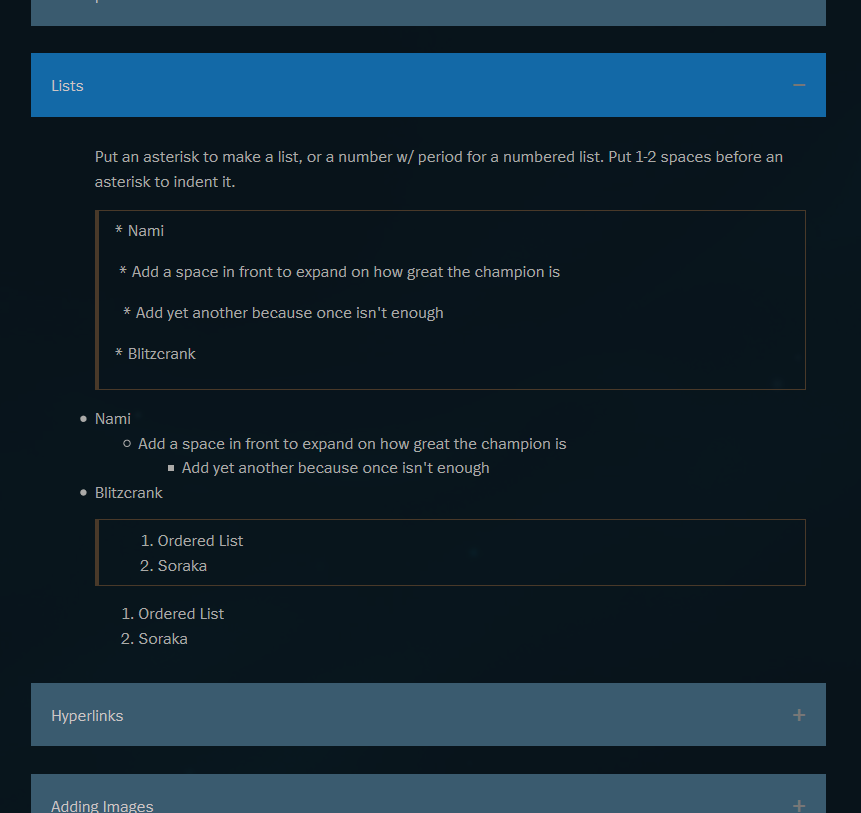
Put an asterisk to make a list, or a number w/ period for a numbered list. Put 1-2 spaces before an asterisk to indent it.
* Nami
* Add a space in front to expand on how great the champion is
* Add yet another because once isn't enough
* Blitzcrank
Hyperlinks
Hyperlinks are my favorite! Use them to turn segments of boring, tasteless text into a rich and vibrant link, such as when you are directing someone to another area of the boards, or don't want a video/image link to embed.
Clicking this will take you to the LoL homepage[Clicking this will take you to the LoL homepage](http://na.leagueoflegends.com/en/)
Adding Images
To embed an image, simply find your image online, right click and copy the Image Address/URL, and paste that into your post.
If your image is from your computer, upload it somewhere online first, like imgur or gyazo.
Imgur links may embed cropped. Affix [/img] to the URL and it should embed properly.
https://i.gyazo.com/60dae3aaeeb6bf71919cf40fc9e2213e.gif[/img]

Additionally, if you place an image link in hyperlink parenthesis but don't enter any text in the brackets, the image won't be visible. How is this useful? The first image in your thread will be the preview, so you can use this to create the preview you want without having an unwanted image inside!
[](hahayeah.com/namisplash.jpg)
Text size
Change the size of the entire paragraph with #. You can't only change a segment or use different sizes in the same paragraph though. This is great for headers and footnotes.
#Big header text!
##Not quite as big
######teeny tiny text
Big header text!
Not quite as big
teeny tiny text
Horizontal divider
Further separate different areas of your discussion by dropping a line between them.
Place three hyphens, asterisks, or underscores by themselves on a line...
---
***
___
...and you'll get dividers like these.

Cancel formatting
If you want to show items that will unintentionally format your text, use a \ backslash in front of it to cancel.
\*\*not bold\*\* \*not italicized\*
not bold not italicized
This concludes Part 1 of our Boards Usage series, Formatting. Now go forth, and may your words reach the very souls of your fellow Summoners!