Skip to content

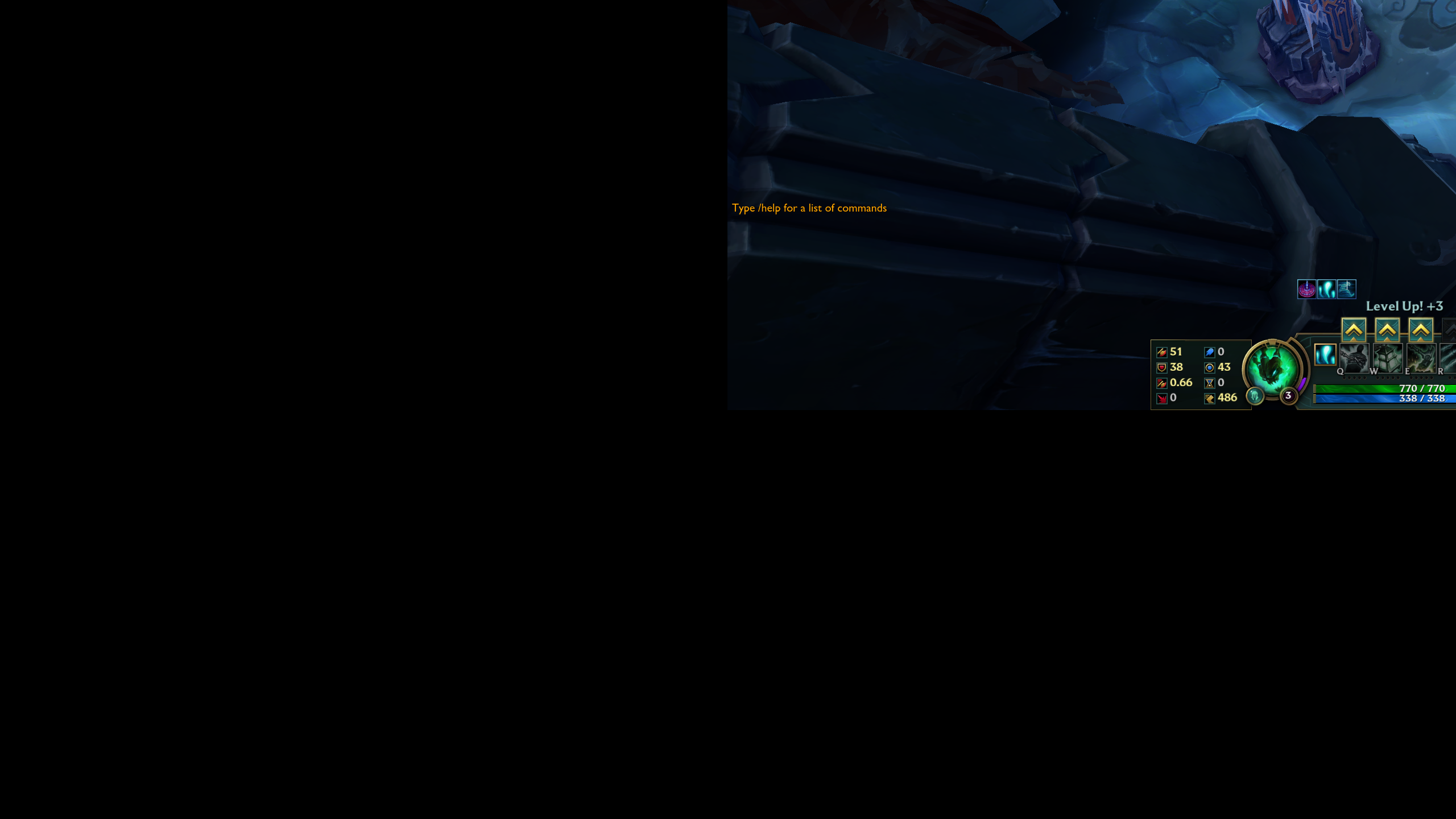
Can't play league. SCREEN IS ON THE TOP RIGHT SIDE (quarter of the screen) + SCREENSHOTS

Arkantasa··23 votes·2,549 views

like previously mentioned here on the forums, i can't play league. My screen is literally only on the top right. I couldn't see anything apart from the fountain. Thank god it was just an ARAM, but it's still a game automatically lost because of me, because of the bug. Please fix it!

https://i.gyazo.com/e9387534d866f5fe9cbaa8dd936abdf9.png

https://i.gyazo.com/399e587154139e3e307ca88cd8092dc8.png

45 Comments

havenhei974 votes

i have the same problem and im using mac book. i dont know what happen.

JweezyDC3 votes

Same problem. Good luck getting riot to respond.

IM Plastic GoD3 votes

MAC ALSO HAVE THE RIGHT TO PLAY LEAGUEBraum

MamaGooseHuang1 votes

[{quoted}](name=IM Plastic GoD,realm=NA,application-id=LqLKtMpN,discussion-id=uh7bZTJx,comment-id=0004,timestamp=2017-05-03T15:32:03.428+0000)

MAC ALSO HAVE THE RIGHT TO PLAY LEAGUEBraum

Please contact riot..!

Easy as Troll3 votes

Same happens to me, fix it pls, or I'll destroy my MacBookkkkk!

MamaGooseHuang1 votes

Lol ikr... so frustrating Yasuo

UW Pluto3 votes

SAME PROBLEM HAPPENS ON MY MAC

Rachel sxx3 votes

same problem on macbook pro. Hope this bug can be fix tomorrow.

Pilot G2 Bold3 votes

Was anyone with this issue on Mac able to fix it?

Myha3 votes

Same issue here. I also have a macbook pro and it was running fine last night...

BLACK REALM GOD2 votes

likely your resolution reset with the recent patch.

JweezyDC1 votes

Nah.

Shifu 420 5 votes

10000000 PEOPLES WITH MAC"S HAVE THIS RIGHT NOWW

Arkantasa2 votes

[{quoted}](name=BLACK REALM GOD,realm=NA,application-id=LqLKtMpN,discussion-id=uh7bZTJx,comment-id=0001,timestamp=2017-05-03T14:04:55.799+0000)

likely your resolution reset with the recent patch.

Because clearly my resolution is set to have the game on the top right. sure. LOL

BLACK REALM GOD2 votes

that's how resolution works. if your monitor's resolution is incorrect and then your game is set to a different resolution from your monitors incorrect resolution then you can end up with a distorted image on screen. you could also have a faulty video card. or if you're using a low end laptop that doesnt support the different plug ins needed to run league it can cause your laptop to swap to low spec mode and distort everything.

anyway it's worth checking out. you might need to update your flash player (or whatever league uses) or graphics driver.

JweezyDC3 votes

[{quoted}](name=BLACK REALM GOD,realm=NA,application-id=LqLKtMpN,discussion-id=uh7bZTJx,comment-id=000100010000,timestamp=2017-05-03T14:34:02.966+0000)

that's how resolution works. if your monitor's resolution is incorrect and then your game is set to a different resolution from your monitors incorrect resolution then you can end up with a distorted image on screen. you could also have a faulty video card. or if you're using a low end laptop that doesnt support the different plug ins needed to run league it can cause your laptop to swap to low spec mode and distort everything.

anyway it's worth checking out. you might need to update your flash player (or whatever league uses) or graphics driver.

Guy, this is happening to thousands of people. You don't know what you're talking about.
BLACK REALM GOD2 votes

you're insinuating that there's no possible way that 1000's of people can be having the same issue due to outdated hardware/damaged hardware? okay.

the only other possible thing that could be causing it is translation error.

JweezyDC2 votes

On the new mac book pro, running newest software/OS? When it was working last night?

BLACK REALM GOD2 votes

last night the mid season update wasnt active. today it is. when files are updated sometimes settings change and end up reverting to default. it can also cause them to corrupt. mac isnt the only operating system around and you didnt buy it running the newest software because it's impossible to do so. you have to update it constantly just like anything else. software is shipped out every week and hardware every season. there's literally no way to be all up to date.

the new rift herald seems a bit graphics intensive and so does the new visual effects. if you're using a mac BOOK you're probably having gpu issues.

Susurro4 votes

You really don't know what you are talking about our MacBooks are completely updated, I personally can't stand not updating and this isn't a resolution problem either, this is a bug, a patch bug.

BLACK REALM GOD2 votes
MamaGooseHuang1 votes

It was working the last time I was on, but now it isn't working...

Dranor1 votes

{quoted}

Because clearly my resolution is set to have the game on the top right. sure. LOL

The guy is trying to help I don't see why you gotta be rude about it... And if it ends up being that issue you'll look stupid to everyone. Just be patient and wait for Riot, they have a lot on their hands with MSI and everything right now.

Arkantasa2 votes

{quoted}

The guy is trying to help I don't see why you gotta be rude about it... And if it ends up being that issue you'll look stupid to everyone. Just be patient and wait for Riot, they have a lot on their hands with MSI and everything right now.

Oh sorry if it sounded rude, i was being sarcastic more than rude. A rioter already replied saying that switching to windowed mode fixes it FOR NOW, but yeah... gg lol it's not resolution-related since all mac users are experiencing this :/

DrCyanide2 votes

You can probably adjust the game to be in Windowed mode to fix it, but that certainly is weird.

leechoffme2 votes

can't because you can't see the controls for windows mode

DrCyanide1 votes

You can change the setting from the config file without the game open. Didn't they also add a way to adjust settings from the client?

RainbowIcee1 votes

so this is only a problem for full screen? okay then i guess i don't have to worry about it.

MamaGooseHuang2 votes

SAME FOR ME! I REINSTALLED AND CHECKED FOR PROBLEMS! Still doesn't work... I'm on the new MacBook Pro

MamaGooseHuang2 votes

#MacBooksLeagueToo!

SrCm Storm2 votes

+1 iMac Retina same issue! Can't access any option.

The Cure1 votes

I was having this issue with the PBE client after midseason patch was applied and I was hoping they'd fix it before live but now live client has this issue for me as well.. hope it gets fixed-- A quick fix for individuals in game is to bring up your settings menu with esc and drag the window down in such a way that you can see the "video" option and then switch to windowed. You can at least finish your game but this doesn't fix fullscreen

El Carlos1 votes

After going on Windowed just change it again to Fullscreen, you'll have to do this every time you go into game tho..

The Cure2 votes

{quoted}

After going on Windowed just change it again to Fullscreen, you'll have to do this every time you go into game tho..

i tried this and it mostly worked but the screen is pushed up about an inch it feels? so i can see my skill bar but i can't see team kills KDA ping etc. screenshot: https://puu.sh/vEBM5/0d1d7f1fa1.png

El Carlos1 votes

Seems just fine on my MacBook, guess we will have to live with it until they fix it.[slayer-jinx-unamused]

El Carlos1 votes

I also freaked out when I saw this, to fix it simply press 'Esc' and drag the screen to be able to click 'Video' and then on top left change it to windowed mode and then change it again to fullscreen. I have to do this every single time I start a game tho.. Hope this helps..

alichacha1 votes

Same problem with Macbook pro

Gloop Gleep1 votes

Have the same issue [MacBook Pro (Retina, 15-inch, Late 2013)]. Strangely enough this only happens in normals games, testing it with a custom game worked fine, loading screen and in-game fullscreen. In the normals game I've tried changing the resolution to windowed then fullscreen, but resulted in the top portion of the screen being cropped preventing me from panning up. Currently the windowed borderless setting works best, and still fully playable.

longdong1111 votes

+1 with macbook pro, league is unplayable currently

The Holy Son1 votes

You should check if the display resolution in your system preferences is the same as the resolution in game. ive been trying to fix the stupid borderless bug where its not fitting my whole screen and the same thing happened when 1/4 of the game was on the top right corner( when my preferences had a lower resolution than in-game.) Might fix it for u.

MamaGooseHuang1 votes

This isn't just ARAM for me... :/ its for everything... [new MacBook 13 in]

Dutton101 votes

Happened to me as well and I wish I was tech save to know what all this yall are saying means... hopefully, they will get it fixed soon.

H1RO1 votes

It also happened to me since I update last time. I am using macbook 15 in. I was playing the rank and I tried to restart my laptop few times, then tried the normal game, still same problem happened to me. Please fix it.

Arkantasa1 votes

For now I have to play on windowed mode its kinda stupid lol. using iMac 5K. My mac's resolution is 5k but I'm playing on 25xx league because "apparently" they don't have a proper 5k resolution, or anything higher than 25xx. my mouse and minimap and chat just become so small that it's unplayable so i could never use my actual resolution :(

More from Report a Bug

More by Arkantasa