Skip to content

[Client] Client won't stop updating and giving errors.

Mellori··7 votes·3,111 views

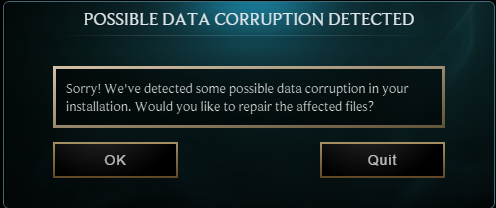
So, when the update came out, I, like everyone else, updated it to play. I have a habit of leaving my League logged in, so I hadn't signed out since the update until this morning to reboot. When I tried logging on again, it updated all over again from scratch. Now, after my computer died, it popped up with this:

http://i.gyazo.com/acc6c07d6e592873cd0c0903a83d5fed.png

http://i.gyazo.com/e656c6bfd1749afd29427abe739c6cca.png

It's been sitting at 0% and goes back and forth between 0 and 1 file scanned. Why does the client not want me to play so bad? It worked fine when I played earlier today, then I idled while I went to watch a movie, my computer died, and now after rebooting it's doing this. I don't want to uninstall/reinstall and lose my item sets. Help?

Edit: It finally finished updating for a third time after an hour and a half.
12 Comments

Final Raid Boss2 votes

what the fuck is with riots shit client? i open the launcher today and now it's scanning files stuck at 33%. I already had the patch downloaded.

every fucking day it's a new problem: clients bugged, games bugged, lag, ddos. it all just goes to show how much of riots income goes towards the game. (they made close to a billion $ in 2014)

moltender1 votes

Mine did the same thing when I tried to login 10 minutes ago. Haven't played since yesterday (already updated twice this week). Currently sitting at 3%, 0 files scanned.

Mellori1 votes

Mine just finished, but it took forever to start moving the percentage.

moltender1 votes

Mine just finished! Only took about 20 minutes... Still annoying though

RiotLiL Batman1 votes

Hey Masochistic Bat,

Could you send me your patcher logs? Thank you in advance!

How to obtain patcher logs:

  1. Launch Patcher
  2. Press on Help Icon ("?")
  3. Press save logs
  4. Upload to Google Drive or Drop Box
  5. Share link with me
Bánh Pao1 votes

How do I share the link to you? I am using Google Drive to send my logs to you.

RiotLiL Batman1 votes

Hey Moltender,

Would you be able to send me your patcher logs? A lot of players are encountering a similar issue with corrupt install notifications and if I could get some player logs I will be able to track down the root cause. You can upload them to Drop Box or Google Drive and PM me the link (make sure to make the link public).

If anyone else is getting the same corrupt installation error, feel free to send me your logs as well. Thank you!

How to obtain patcher logs:

  1. Launch Patcher
  2. Press on Help Icon ("?")
  3. Press save logs
  4. Upload to Google Drive or Drop Box
  5. Share link with me
Bánh Pao1 votes

How do I share the link to you? I am using Google Drive to send my logs to you.

Colgate Gator1 votes

I just had this, although it only took 1-2 mins to finish repairing the client, I had assumed it was going to scan the whole thing.

Mellori1 votes

Yeah, mine took a few minutes short of an hour and a half.

The Pajama King1 votes

Yup same issue, I've been trying to patch the client ALL DAY. I've closed and reopened the client at least 20 times (that usually does the trick whenever I have problems). I've sent all the logs. I really don't want to repair the client because I fear that will take forever and I have A LOT of item sets that I don't want to lose. I've found the mac client to be quite buggy overall actually.

The Pajama King1 votes

Yeah so I just repaired the client, took about 10 minutes. I lost my item sets but oh well.

More from Report a Bug

More by Mellori