10 Comments
 CommandoOne2 votes
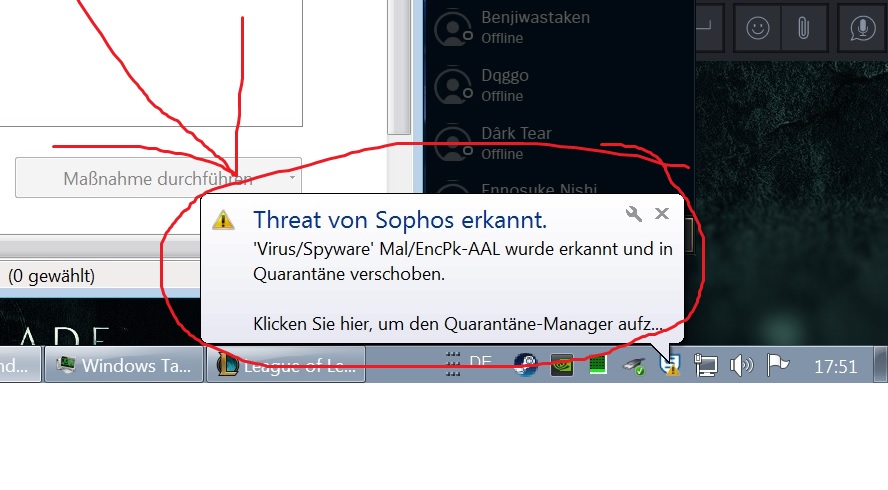
I have the same issue. It shows up briefly in quarantine before it removes it completely. It is removing the stub.dll file. I tried to add an exception to the file or folder, but it didn't work. Probably because I'm on a work computer and their policy overrides my exclusions.
 Fridayeth2 votes
Same issue here, using school sophos, I excluded the file from the on-access scanning but still doesn't work, big rip :(
 LUCILIUSMAGNUS2 votes
I hate the same issue! Please resolve this ASAP.
 3TWarrior1 votes
well, first look up the malware that it detected. Security has a funny way of intruding on general use.
Second, it is POSSIBLE but unlikely that Riot's files somehow got infected.
likely what happened was that Sophos detected something it had not seen before and decided that it might be malicious. If the game functions, it is probably fine.
Keep a note of that this happened and if any issues arise, first try repairing the game and then if issues persist, contact support
 Rise of Tyr3 votes
i did the repair mode already and i contact the support to. In my experience, it unfortunately takes a few days to get an answer there :/ but thanks anyway :)
 Dynamike1 votes
Had the same error, Putting D:\Riot Games\League of Legends\Game\stub.dll as an exception for the live scan helped
 grundy91 votes
Same problem, key solution is where you add the exception: From main menus: Configure-->Anti-Virus-->On-access Scanning-->Exclusions works! (From Home: Configure Anti-Virus and HIPS--> Authorization Manager does NOT work.)
Note giving authorizations does nothing, you need to add an "EXCLUSION."
Good luck, hope that helps.
LUCILIUSMAGNUS1 votesSame problem, key solution is where you add the exception: From main menus: Configure-->Anti-Virus-->On-access Scanning-->Exclusions works! (From Home: Configure Anti-Virus and HIPS--> Authorization Manager does NOT work.)
Note giving authorizations does nothing, you need to add an "EXCLUSION."
Good luck, hope that helps.
Unfortunately, this doesn't work for me. The more interesting question. Why is that file recognised as a virus? Why doesn't LOL say anything about that?
grundy91 votesSame problem, key solution is where you add the exception: From main menus: Configure-->Anti-Virus-->On-access Scanning-->Exclusions works! (From Home: Configure Anti-Virus and HIPS--> Authorization Manager does NOT work.)
Note giving authorizations does nothing, you need to add an "EXCLUSION."
Good luck, hope that helps.
LUCILIUSMAGNUS1 votesDid anyone recieve an official word from riot games?
More from Report a Bug
Can't hover over friends
Report a Bug236 comments
663
votes
Infinite Loop Client Restart
Report a Bug886 comments
626
votes
patch 5.18 unexpected platform error
Report a Bug425 comments
445
votes
Origin of Master Yi Alpha Bug
Report a Bug176 comments
330
votes
Elise Can Only Rappel to Wolves on Blue Side
Report a Bug47 comments
277
votes
Loading bug
Report a Bug426 comments
274
votes