I have 80 FPS but 60% of the times it feel like it’s 15fps.
Evil Μorty··2 votes·1,179 views

Hello summoners, so today I wanted to ask about a problem that I have been having for weeks, and the odd thing is that it was happening on 2 different computers, a Mac, and a gaming computer running GTX 1050 ti, 8gb ram, so the problem is that many times I feel like I’m playing 10-15 FPS, while it shown on the monitor that I’ve got 100-150fps, I reinstalled lol by deleting it completely, changed the setting of lol, changed the setting of nividia, initiated full repair, and looked desperately on forums and I indeed did found very similar threats, but yet no solution! Other games work perfectly fine and smooth, expect for lol! Please help! It makes my games unplayable!

14 Comments

Nami Want Salami2 votes

Is the game on fullscreen mode or borderless?

Evil Μorty1 votes

Full screen mode, I also tried other resolutions, but with no results.

Nami Want Salami2 votes

[{quoted}](name=BMO is bae,realm=EUW,application-id=LqLKtMpN,discussion-id=yZ36ncFq,comment-id=00000000,timestamp=2019-06-22T21:28:54.428+0000)

Full screen mode, I also tried other resolutions, but with no results.

Do you have a dual monitor setup or just one monitor?

Evil Μorty1 votes

One monitor, I also run other games smoothly with no problem

Nami Want Salami2 votes

[{quoted}](name=BMO is bae,realm=EUW,application-id=LqLKtMpN,discussion-id=yZ36ncFq,comment-id=0000000000000000,timestamp=2019-06-22T21:31:12.282+0000)

One monitor, I also run other games smoothly with no problem

Maybe try disabling g-synch and see if that helps. I had this problem before a while back but it stopped after a driver update.

Spisepinden1 votes

[{quoted}](name=Ask Me For Boop,realm=NA,application-id=LqLKtMpN,discussion-id=yZ36ncFq,comment-id=00000000000000000000,timestamp=2019-06-22T21:34:13.337+0000)

Maybe try disabling g-synch and see if that helps. I had this problem before a while back but it stopped after a driver update.

I experienced the same thing. I would head into practice mode and check v-sync settings as well.

Evil Μorty1 votes

Hi please can you guide me to that v-sync I’m literally a newbie when it comes to computers and stuff

Nami Want Salami1 votes

[{quoted}](name=BMO is bae,realm=EUW,application-id=LqLKtMpN,discussion-id=yZ36ncFq,comment-id=0000000000000000000000000000,timestamp=2019-06-22T21:43:40.462+0000)

Hi please can you guide me to that v-sync I’m literally a newbie when it comes to computers and stuff

If enabling or disabling g-synch doesn't work, try capping your frames to the refresh rate of your monitor or turning on v-synch in the video tab in your league settings https://i.gyazo.com/145de6aed2b0a176b2e2690ddbe07829.png

Evil Μorty1 votes

This worked, but it making my game feels laggy now lol

Spisepinden1 votes

[{quoted}](name=BMO is bae,realm=EUW,application-id=LqLKtMpN,discussion-id=yZ36ncFq,comment-id=000000000000000000000000000000000000,timestamp=2019-06-22T22:45:20.565+0000)

This worked, but it making my game feels laggy now lol

Waiting for V-sync is rarely the optimal solution. Ideally you'll want either g-sync or freesync depending on your monitor and graphics card. I wonder if the problem persists if you turn off "waiting for v-sync" again?

Btw have you tried updating your graphics drivers?

Evil Μorty1 votes

Will you just ignore me the fact that this almost solved my mistake and leave me like that?

Evil Μorty1 votes

Can you please guide me how to change this, if it got fixed you wouldn’t expect how grateful I would be

Nami Want Salami1 votes

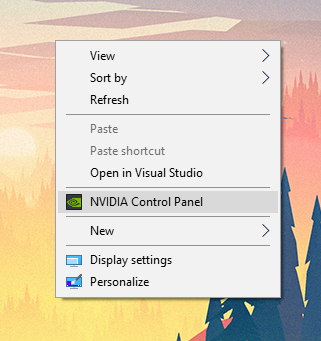
Right click on the desktop and click on this: https://i.gyazo.com/180228a2f6c665c28b1a2c8746d19cf1.png

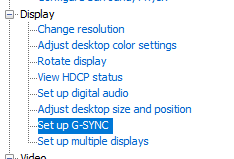
Next go here: https://i.gyazo.com/b21145dcff868cb34b3335292e0bfacd.png

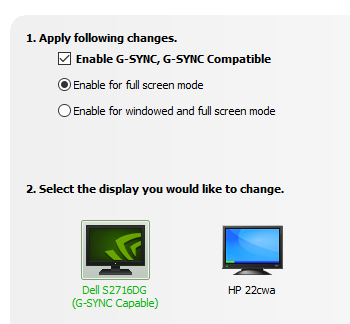
Now try disabling g-synch or enable it if you have it disabled and see if that works https://i.gyazo.com/55226069adb815390ba7a5dd85545789.png

Evil Μorty1 votes

I have no G-sync section in my Nicosia control panel.

More from Report a Bug