How I play league with a controller

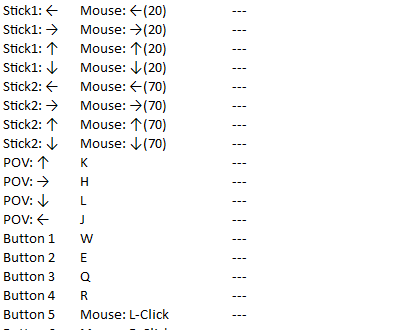
I don't always play it with a controller, but it's fun and challenging. If you want to play this game with a controller, you need to download a program called "JoyToKey." It's pretty much an emulator where if you press certain buttons on your controller (for example, let's say you pressed "X") it would emulate you pressing a keyboard button or mouse click (pressing "X" would come out as "G"). Here's my setup for it:
Joystick 1: https://i.gyazo.com/b8e9a58af6fde4ee4e0aca08b8314b25.png https://i.gyazo.com/6f8c201a80a302f6db9be44c746efe44.png
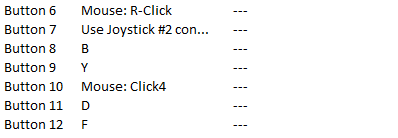
Joystick 2: https://i.gyazo.com/6f8c201a80a302f6db9be44c746efe44.png https://i.gyazo.com/43cd7f94c67028e2aed7a653341b52f6.png

And I don't play with 2 controllers, what it means by joystick 1 and 2 is that I have a button where when I'm holding it down I can access another set of commands, so I have space for abilities, items, and pings.
I also set space to Attack Move, and K, H, L, and J are the ping wheel, arranged in the same way the ping wheel would be.
I have 2 joysticks to move my mouse for more complex things. "Stick 1" is for smaller and more precise things, like last hitting, "Stick 2" is for more grand things, like moving your screen.
Anyways, it's pretty fun to play league with a controller, and if you have one, I'd recommend trying it at least once.
(I also stream myself playing league with a controller sometimes--https://www.twitch.tv/thecontrollerkid )