How to ping Riot's servers to test your connection

Downloading executables people give you on the forums is a bad idea. However well intentioned it may be, it's not a good practice and shouldn't be encourage.
I have a good alternative though; teach people how to make their own! It's fairly simple, and for the most part you just provide them some text to copy-paste in notepad, then they change the notepad file to a batch file.
- Open Notepad
- Enter the following text. All it says is for your PC to run a ping to the server through your Command Prompt;
cd c:/windows/system32 ping 104.160.131.1 -t pause
- Save and close the file. You now need to change the file into a batch file. Batch files are simple icons that you click to run the script.
- To change the file type you need to display file extensions first;
- Open Folder Options by clicking the Start button , clicking Control Panel, clicking Appearance and Personalization, and then clicking Folder Options.
- Click the View tab, and then, under Advanced settings, clear the Hide extensions for known file types check box, and then click OK. (uncheck the option highlighted below in red) https://i.gyazo.com/0d64124fce088f6d91bdd11ef117ef25.png
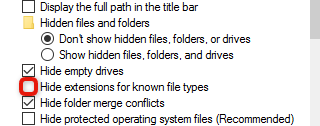
- Now simply go rename your Notepad file from "untitled.txt" to "untitled.bat". .bat is the file extension for a batch file.
Now you have an icon that you click and it pings the NA server until you want it to stop! Press Ctrl+C and it will stop the ping and give you a min/max/average readout. If you only want it to ping 4 times and stop, just remove the "-t" from the script. You can even get this script to save a text recording of the ping, run a traceroute, or ping other servers and all that info can be found on the Network, System and LoL Logs support article.
Let me know if you have any questions. Except for Mac, idk about Mac.