Suggestion: Show the "Champion Lock In" button on the rune page editing menu

While I generally don't agree with the sentiment of "rune pages should be free", there is a specific case of rune page building that makes building a rune page on the fly hard. When you are last pick or second to last pick and you're not just a one trick, you'll often find yourself building your rune page before you lock in because after you lock in you only have ~25 seconds to make game changing decisions. Building the rune page before locking in can be stressful because if you don't complete the page in the 20 seconds you have to pick, you need to close your rune page, lock in and select summoners, and then go right back into the rune page to finish.
My solution is to just have a mini lock in button and champ status somewhere on the rune page building screen, see the mockup I made (lock in button from old client):
https://i.gyazo.com/6a8ed6aca4fad06c0ee9ef77a9fcb5e0.png
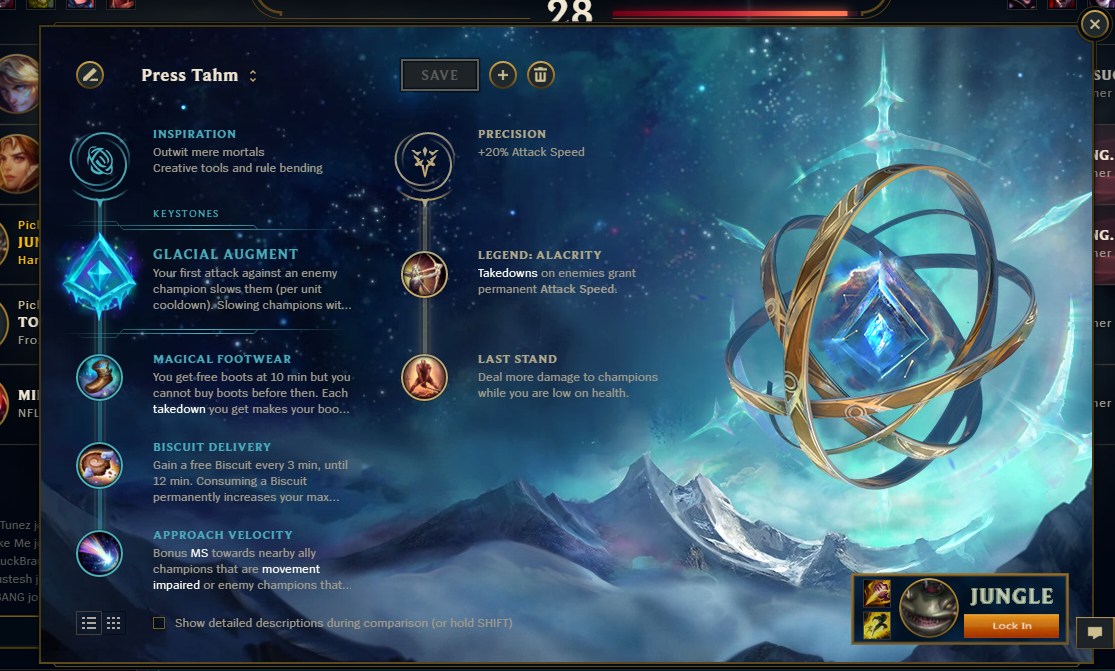
With this button addition, you can set up your rune pages and lock in your champion from the rune page, allowing you to fully use the remaining time of your champ select timer to pick runes without worrying about being kicked for not locking in.